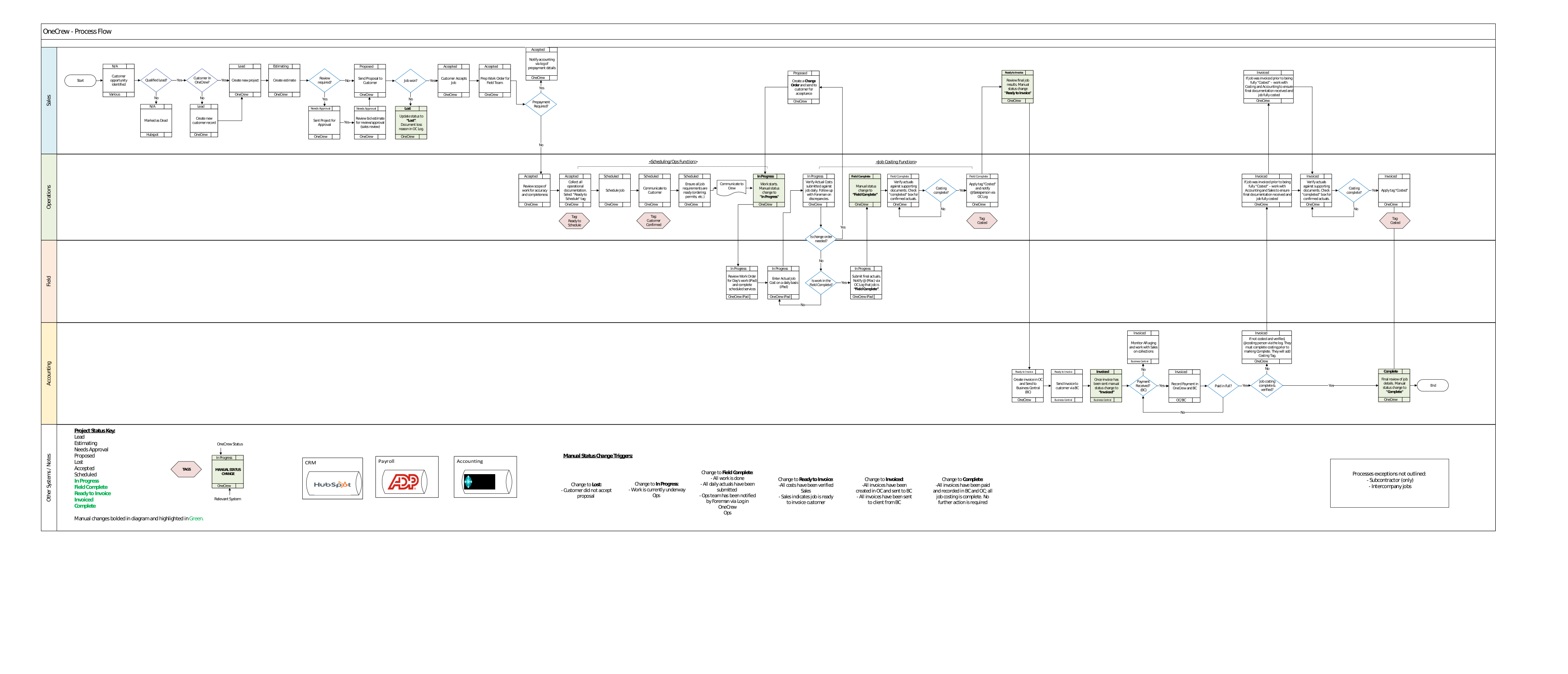
Learn how work moves through OneCrew from the initial customer opportunity through estimating, scheduling, field work, costing, invoicing, and completion.
The OneCrew workflow shows how a customer opportunity moves through the company from the first sales activity to final Project completion.
Because multiple departments use the same Project record, each team must complete its part of the process accurately before handing the work to the next team.
This page provides a beginner-friendly overview. Use the full process map below when you need the detailed workflow, decision points, status changes, tags, and team responsibilities.
Walkthrough Video
Watch this video for an explanation of the OneCrew process map and how work moves across Sales, Operations, Field, Accounting, and related systems.
OneCrew Process Map
Select the process map to open the full-size image in a new tab, where you can zoom in and review the details.
The map is divided into horizontal sections that show which team or system is responsible for each part of the workflow.
Map Area
What It Shows
Sales
Customer setup, Projects, Estimates, Proposals, customer acceptance, final job review, and readiness for invoicing.
Operations
Work Order preparation, documentation, scheduling readiness, crew communication, scheduling, and cost verification.
Field
Reviewing Work Orders, completing scheduled services, entering daily actuals, and notifying Operations when field work is complete.
Accounting
Creating and sending invoices, recording payments, monitoring accounts receivable, and supporting final Project completion.
Other Systems / Notes
Related systems, status keys, tags, manual status triggers, and workflow exceptions.
High-Level OneCrew Workflow
Most Projects follow this general path through OneCrew:
1
Customer Opportunity
A customer opportunity is identified. The existing customer record is reviewed or a new customer record is created when needed.
2
Project and Estimate
A Project is created and an Estimate is prepared. Some Estimates may require review or approval before moving forward.
3
Proposal
The Proposal is sent to the customer. If the customer does not accept it, the Project may be marked Lost and the reason should be documented in the OneCrew Log.
4
Accepted Work
After the customer accepts the job, the scope and operational requirements are reviewed before the Project is prepared for scheduling.
5
Scheduling and Preparation
The Work Order is prepared, required documentation is collected, job requirements are confirmed, and the Project is scheduled for the correct crew.
6
Field Work and Actuals
When work begins, the Project moves to In Progress. Field teams review the Work Order, complete scheduled services, and submit actual job costs daily.
7
Field Complete and Costing
After all work and daily actuals are complete, the field team notifies Operations through the OneCrew Log. Actuals and supporting documents are then reviewed and verified.
8
Ready to Invoice
Once costs have been verified and Sales completes the final job review, the Project can move to Ready to Invoice.
9
Invoice and Payment
The invoice is created in OneCrew, sent to Business Central, and delivered to the customer from Business Central. Payment and accounts receivable activity are then monitored.
10
Complete
The Project is marked Complete after invoices are paid, costing is complete, and no further action is required.
Key Team Handoffs
A handoff occurs when one team completes its responsibility and another team takes over the next part of the Project.
Handoff
What Should Be Ready
Sales to Operations
The job is accepted, the scope has been reviewed, and the operational documentation or requirements are being prepared.
Operations to Field
The Work Order is ready, the job is scheduled, requirements have been confirmed, and the crew has been notified.
Field to Operations/Costing
All work is complete, daily actuals have been submitted, and the team has been notified through the OneCrew Log.
Costing to Sales
Actual costs and supporting documents have been verified and the Costed tag has been applied.
Sales to Accounting
Final job results have been reviewed and the Project is ready to invoice.
Accounting to Final Completion
Invoices have been sent, payments are recorded, and any remaining costing requirements have been completed.
Manual Status Changes
Several important workflow stages require a user to manually update the Project status after confirming the required work is complete.
Status
When It Should Be Used
Lost
The customer did not accept the Proposal. Document the reason in the OneCrew Log.
In Progress
Work is currently underway.
Field Complete
All field work is finished, daily actuals have been submitted, and Operations has been notified through the OneCrew Log.
Ready to Invoice
Costs have been verified and Sales has confirmed that the Project is ready to invoice.
Invoiced
Invoices have been created in OneCrew, sent to Business Central, and sent to the customer.
Complete
Invoices are paid and recorded, job costing is complete, and no further action is required.
The next Start Here page explains Project statuses in more detail.
Tags and Communication
The process map includes tags and Log notifications that help communicate when specific workflow requirements have been completed.
Ready to Schedule: Operational documentation has been collected and the Project is being prepared for scheduling.
Customer Confirmed: Indicates that customer-related scheduling confirmation has been completed when required.
Costed: Actual costs and supporting documentation have been reviewed and verified.
OneCrew Log: Used to document important updates and notify the next responsible person or team.
Tag usage may vary by business unit. Follow your BU's established process and do not create new tags without approval.
Systems Involved
OneCrew is the main Project workflow system, but some steps connect to other systems.
System
Role in the Workflow
OneCrew
Customer and Project records, Estimates, Proposals, Work Orders, Scheduling, Logs, Actuals, Costing, invoices, and statuses.
OneCrew iPad
Field access to Work Orders, scheduled services, daily actuals, and field completion activities.
HubSpot
Some early customer opportunities or lead qualification activities may begin outside OneCrew.