Consistent naming helps employees find the correct OneCrew records,
understand what each record represents, and avoid creating
duplicate Accounts, Sites, and Projects.
Every OneCrew user should understand the difference between an
Account, a Site, and a Project before creating or editing a record.
Each type of record has a different purpose and follows a different
naming pattern.
A clear name should help another employee understand who the
customer is, where the location is, or what work is being
performed without opening the record first.
Understand the Record Types
Before entering a name, determine which type of OneCrew record you
are creating.
1
Account
An Account represents the legal company or organization that
HPP does business with.
Account = Who is the customer?
2
Site
A Site represents a physical location connected to an Account.
Site = Where is the location?
3
Project
A Project represents the specific work being estimated,
scheduled, performed, costed, or invoiced at a Site.
Project = What work are we performing?
Account = Who. Site = Where. Project = What work.
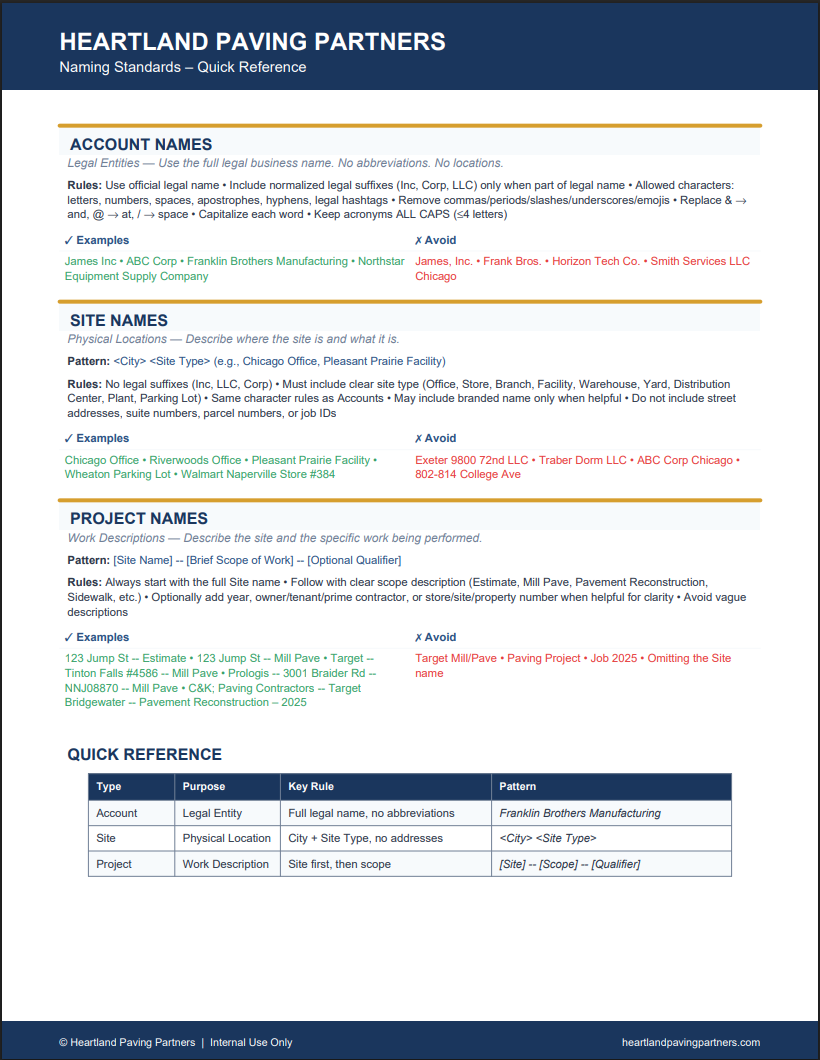
Naming Standards Quick Reference
Use this one-page guide when creating or reviewing Account, Site,
and Project names. Select the image to open the full-size version
in a new tab.
Always search OneCrew before creating a new Account, Site, or
Project. Following the naming rules does not prevent duplicates if
an existing record is overlooked.
Before Creating an Account
Search the full legal business name.
Search common shortened versions of the company name.
Review similar results carefully.
Confirm the company does not already exist in OneCrew.
Before Creating a Site
Open the correct Account first.
Review all Sites already connected to the Account.
Look for the same city, facility, store, or property.
Before Creating a Project
Open the correct Account and Site.
Review existing and recent Projects.
Confirm the work is not already being tracked.
Do not create a new record only because an existing name is
slightly different. Review the existing record and confirm
whether it represents the same company, location, or work.
Account Names
Account names identify legal business entities. The Account name
should match the full official business name and should not contain
location details.
Account naming pattern: Full legal business name
Account Name Rules
Use the full official legal business name.
Do not include a city, office, branch, or other location in the Account name.
Do not abbreviate words unless the abbreviation is part of the official legal name.
Include legal suffixes such as Inc, Corp, or LLC only when they are part of the legal name.
Remove unnecessary punctuation such as commas and periods.
Capitalize each word appropriately.
Keep acronyms of four letters or fewer in all capital letters.
Correct Account Examples
James Inc
ABC Corp
Franklin Brothers Manufacturing
Northstar Equipment Supply Company
Account Names to Avoid
James, Inc.
Frank Bros.
Horizon Tech Co.
Smith Services LLC Chicago
Different locations belonging to the same legal company should
normally be created as Sites under one Account, not as separate
Accounts.
Site Names
Site names identify physical locations. A Site name should explain
where the location is and what type of location it represents.
Site naming pattern: <City> <Site Type>
Common Site Types
Office
Store
Branch
Facility
Warehouse
Yard
Distribution Center
Plant
Parking Lot
Site Name Rules
Use Site names for physical locations.
Include a clear Site type such as Office, Store, Facility, Warehouse, Yard, Plant, or Parking Lot.
Do not include legal suffixes such as Inc, LLC, or Corp.
Do not use a street address as the Site name.
Do not include suite numbers, parcel numbers, job numbers, or Project IDs.
Include a branded name only when it helps identify the location.
Correct Site Examples
Chicago Office
Riverwoods Office
Pleasant Prairie Facility
Wheaton Parking Lot
Walmart Naperville Store #384
Site Names to Avoid
Exeter 9800 72nd LLC
Traber Dorm LLC
ABC Corp Chicago
802-814 College Ave
Project Names
Project names describe the specific work being performed. Every
Project name should begin with the full Site name and then identify
the scope of work.
Consistent formatting helps names display correctly in OneCrew
searches, reports, documents, and Project records.
Character or Format
Rule
Letters, numbers, and spaces
Allowed.
Apostrophes and hyphens
Allowed when they are part of the proper name.
Store or property hashtags
Allowed when needed for identification.
Commas and periods
Remove them.
Underscores and emojis
Do not use them.
&
Replace it with the word and.
@
Replace it with the word at.
/
Replace it with a space.
Capitalization
Capitalize each word and keep short acronyms in all capital
letters.
Complete Naming Example
The following example shows how the three records work together.
Record Type
Example Name
What It Represents
Account
Walmart Inc
The legal customer entity.
Site
Walmart Naperville Store #384
The physical customer location.
Project
Walmart Naperville Store #384 -- Mill Pave -- 2026
The specific work being performed at that Site.
The Account identifies the customer, the Site identifies the
location, and the Project identifies the work.
Final Naming Checklist
Before saving a new or updated OneCrew record, confirm the following:
You searched OneCrew for an existing record first.
You selected the correct record type: Account, Site, or Project.
The Account uses the full official legal business name.
The Account does not include location information.
The Site identifies a physical location and includes a clear Site type.
The Site does not include a legal suffix or street address.
The Project begins with the full Site name.
The Project includes a clear and specific scope of work.
Unnecessary punctuation and special characters were removed.
Another employee could understand the name without opening the record.
Where to Go Next
You have completed the Start Here OneCrew training path. You should
now understand how to access OneCrew, navigate and search the
system, follow the general workflow, recognize Project statuses,
and apply the required naming standards.
Your next training depends on your role and daily responsibilities.
Some employees may need training from more than one role section.
Ask your manager which modules are required for your position.
1
Sales and Estimators
Continue with the Sales and Estimators training path. This
section covers Accounts, Contacts, Sites, Project creation,
Estimates, Proposals, Work Orders, scheduling, and other
Sales responsibilities.
2
Field Teams and Foremen
Continue with Field Team training. This section covers
scheduled work, Work Orders, daily actuals, field costing,
and completing field responsibilities in OneCrew.
3
Admins and Operations
Continue with Admins and Operations training. This section
covers Managing Crews, Costing, Variables, Email Templates,
scheduling support, and other operational responsibilities.
4
Accounting and Finance
Continue with the Invoice Process and any additional billing,
payment, costing, or financial procedures assigned to your
role.
5
Managers and Multi-Role Users
Review each training section connected to the processes you
supervise. Managers may need to understand how work moves
across Sales, Operations, Field, Costing, and Accounting.